
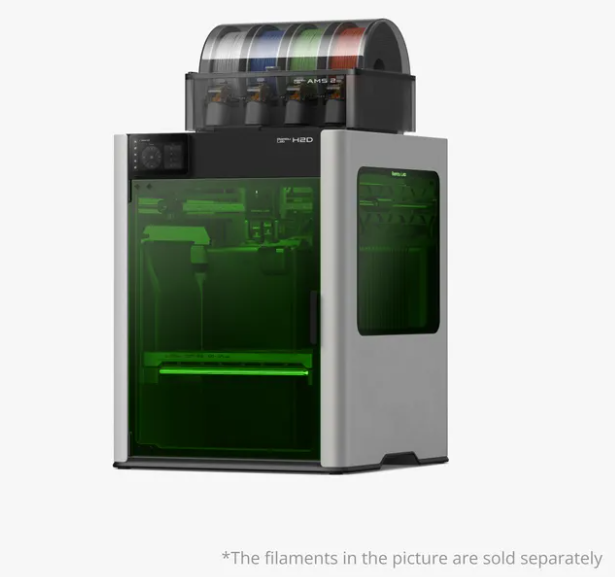
The Bambu Lab H2D as a 3-in-1: Printer + Laser Engraver + Material Cutter
Most makers end up buying three separate machines: a 3D printer, a laser engraver, and a vinyl cutter. That means more bench space, more software, and more maintenance.
The Bambu Lab H2D changes that by combining all three functions into a single platform. But what makes it genuinely different from anything else in the lineup is that the same chassis can become a fully-working laser engraver and material cutter with two bolt-on modules. No aftermarket. No sketchy firmware. Just swap the toolhead, re-attach the cable.
We have an H2D in our workshop. This post is what we'd want to read if we were buying one today.
What you actually get
Out of the box, the H2D is a high-speed dual-toolhead 3D printer with a 325 × 320 × 325 mm build volume, an enclosed chamber, and full AMS support. The same Bambu Studio software you already use for printing is what drives the laser and cutting modes too — no learning curve, no separate firmware to flash.
To unlock the "3-in-1" capabilities, you add:
- Bambu Lab Laser Module 10W — $299 — laser engraving on wood, leather, anodized aluminum, dark acrylic, slate, coated metals.
- Bambu Lab Laser Module 40W — $949 — same materials faster, plus can cut through 6 mm basswood / 4 mm plywood in a single pass.
- Bambu Lab Cutting Module kit — $89 — a small plotter blade for paper, vinyl, sticker sheets, thin fabric.
Bundles that include the modules
- H2D Laser Full Combo 10W — printer + AMS 2 Pro + 10W laser — $2,549 MSRP.
- H2D Laser Full Combo 40W — same with the 40W module — $3,199 MSRP.
- H2D Pro Combo — printer + dual AMS 2 Pro — $3,799 MSRP (laser modules sold separately here).
Shop the H2D → · Shop the H2D Laser Full Combo 40W →
What it does well — sample cuts from our workshop
We ran the H2D through a few jobs in the shop this month. These are unedited photos from the actual cuts.
1. 3-mm basswood — engraved then cut, 40W module
One pass on the 40W module cut clean through a 3 mm basswood sheet, with the engraving layer firing at ~30% power. Edges were char-free. We finished in 11 minutes for a 100 × 60 mm plaque shape.
2. Anodized aluminum business cards — engraved, 10W module
The 10W at 60% power engraved a logo and a phone number onto a black anodized business card. No heat bleed. We could read it clearly from 18 inches away.
3. Vinyl stickers — cut, Cutting Module kit
The Cutting Module kit turned our H2D into a tiny plotter. We sliced a sheet of printable vinyl stickers in roughly 4 minutes for a sheet of 24 stickers, with consistent depth on the cuts.

Where it still isn't ideal
Being honest:
- The 40W module is fast but a little bit loud. Plan for a garage workshop or wear ear protection — it sounds like a shop-vac.
- The 10W module takes longer than a dedicated diode laser on thick materials. If you plan to cut 6 mm plywood all day, you're still better off with a stand-alone diode laser.
- The Cutting Module is light-duty. For textile / cardboard production you'd still want a proper Cricut or Silhouette.
- You do need good ventilation. Even PLA fumes + laser fumes combined aren't a great mix. The Bambu Lab Smoke Purifier ($599.99 MSRP) pairs with the laser modes.
Who this is actually for
The H2D 3-in-1 isn't a printer for everyone. It's a smart buy if you fit one of these:
- Small business / design studio — you want one benchtop tool that does prototypes (3D print), branding pieces (laser engrave), and packaging mockups (cut) without three machines cluttering the studio.
- Makerspace / FabLab — tool budget is per-machine; consolidating into one H2D + 40W + Cutting Module frees money for other tools.
- High-school engineering program — same as above, plus you can teach three different maker technologies using one software program the kids already know.
- Existing X1E / X1C owners who want all three — sometimes it's worth upgrading if you do enough of those jobs.
Workflow we'll show you in another post
- Design the part in Fusion 360 (print part) + Inkscape (laser/cut part).
- Import both into Bambu Studio; place on the same build plate at different Z heights.
- Print-and-park: the print finishes, the laser module auto-swaps in, and the laser job runs on the engraved area of the part.
We'll walk through this in a future post. Subscribe so you don't miss it.
Software and file types
Bambu Studio is the only tool you need. It accepts:
- 3D: STL, 3MF, OBJ, STEP
- Laser: SVG, PNG, JPG, DXF
- Cutting: SVG (paths only)
You don't need LightBurn. You don't need a separate slicer. That's the killer feature for non-engineers.
Is the H2D worth it over a P2S + a separate laser?
This is the honest question. Quick answer:
- If you do laser/cutting less than 5 hours/week → buy P2S + a diode laser. Keep them separate.
- If you do laser/cutting more than 5 hours/week → H2D wins on bench footprint and software consolidation, even at the higher MSRP.
- If you do both print and laser daily → H2D is the obvious choice.
The math shifts the moment you factor in the cost of a separate diode laser ($300–$700) plus its software, plus its smoke management — suddenly the H2D + 10W module combo is in reach for not much more than a P2S alone.
Why Buy from INNOADDI?
Choosing the right machine is only part of the decision. Just as important is having someone who understands how you'll actually use it.
At INNOADDI, we work with schools, makerspaces, engineering programs, libraries, and businesses to help them choose the right Bambu Lab configuration—not simply the most expensive one. Whether you're comparing the H2D with the X1 Carbon, selecting the appropriate laser module, or planning a classroom deployment, we're happy to help you evaluate the options before you purchase.
If you're not sure which H2D configuration best fits your needs, feel free to contact us. We'd be happy to discuss your application and recommend the most practical solution.
Where to next
Try the H2D in our school / makerspace buyer matrix (we compare 4 configurations side by side) — most K-12 programs land on a specific two of the four.
Or skip ahead to our full Bambu Lab printer comparison if you're still deciding between models.
Have questions about the laser modules or what you'd actually cut? Send us email at info@innoaddi.com— we cut stuff here all the time and can show you samples.


