
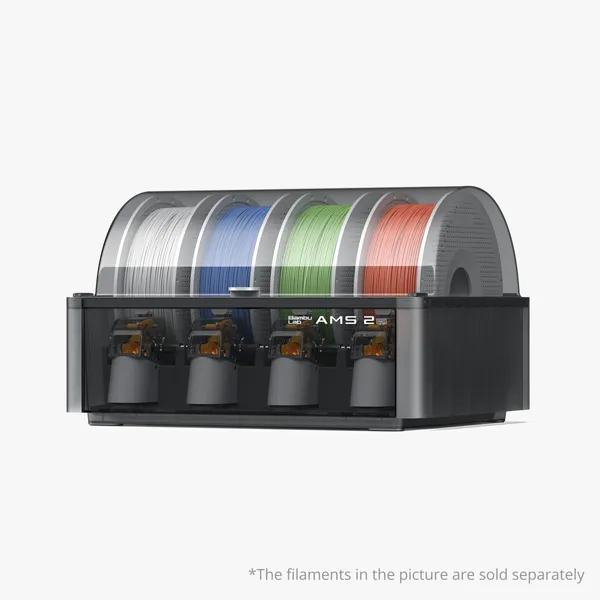
The AMS 2 Pro is the multi-material system that unlocked Bambu Lab's true 16-color potential. But it's also the product we get the most confused-customer emails about — specifically when people try to pair it with the newer X2D, H2D Pro, or P1S. This guide covers what the AMS 2 Pro does, how it compares to AMS lite and AMS HT, the secret "soft-bundle" parts list, and how to make sure the unit you buy actually works with the printer you already own.
What the AMS actually does
AMS stands for Automatic Material System. Drop in up to four spools, the printer auto-loads, auto-cuts, hot-swaps filaments, and buffers. With two AMS units on one printer, you can print up to 16 colors in a single job — no manual swaps, no color contamination.
Bambu Lab makes three AMS flavors. Pick the one your material + workflow needs:
| Model | Current price | Best for | Notes |
|---|---|---|---|
| AMS lite | $199 | A1 mini, A1, A2L (Combo) | External (sits beside the printer); 4 spools; PLA/PETG/TPU. |
| AMS 2 Pro | $299 (was $359) | P1S, P2S, H2S, H2D, H2C, X2D, H2D Pro | Dries + buffers filaments; 4 spools; built-in humidity control. The X2D supports two AMS 2 Pro simultaneously (X2D Print More Bundle includes 2×). H2C and H2D Pro ship with one AMS 2 Pro in their respective combos. |
| AMS HT | $139 | PA / PC / PPS-CF / high-temp engineering filaments | Heated chamber for the AMS unit itself. Use with X2D, H2D, H2C, or H2D Pro. The H2D Pro officially bundles the AMS HT for its PPS-CF rated workflow. |
Compatibility: which AMS pairs with which printer
| Printer | AMS lite | AMS 2 Pro | AMS HT |
|---|---|---|---|
| A1 mini | ✅ | ❌ , *Compatible only when bundled with the AMS Hub (A1 Series). | ❌*Compatible only when bundled with the AMS Hub (A1 Series). |
| A1 | ✅ | ❌*Compatible only when bundled with the AMS Hub (A1 Series). | ❌*Compatible only when bundled with the AMS Hub (A1 Series). |
| A2L | ✅ (Combo) | ✅ (stacked/mixed) | ❌ (open frame, ABS-grade not the A2L's strength) |
| P1S | ✅ | ✅ | ✅ |
| P2S | ✅ | ✅ | ✅ |
| H2S | ✅ | ✅ | ✅ |
| H2D | ✅ | ✅ | ✅ |
| H2C | ✅ | ✅ | ✅ |
| X2D (new) | ❌ | ✅ (1 or 2 units; Print More Bundle ships 2×) | ✅ (via 4-in-1 PTFE Adapter FAZ013-N) |
| X1C (legacy) | ✅ | ✅ (with extras) | ✅ |
| X1E (discontinued) | ✅ | ✅ (with extras) | ✅ |
Two changes worth flagging vs older guides:
- The X1E is discontinued. If you have an X1E, the soft-bundle parts list below still applies — but we no longer recommend buying an X1E new in 2026. Go X2D or H2D Pro
- The X2D is the new accessible dual-nozzle printer. It supports 1 or 2 AMS 2 Pro units natively. The X2D Print More Bundle ($1,149) ships with 2× AMS 2 Pro for up to 16-color printing.
The X1C/P1S/P1P + AMS 2 Pro soft-bundle, explained
When Bambu Lab launched the AMS 2 Pro, it was designed for the new-generation printers (P2S, H2D, H2C). The X1C — still very popular in 2026 — needs four extra parts to talk to the AMS 2 Pro properly. The good news: AMS 2 Pro Upgrade Kit With Buffer and AMS 2 Pro Upgrade Kit 2 with AMS Hub
When you DON'T need an AMS
Be honest with yourself — AMS is a luxury until you actually do multi-color or runout-tolerant prints. Skip the AMS if:
- You mostly print single-color functional parts.
- You're buying a printer for an elementary classroom that doesn't need color storytelling.
- You're buying the AMS "just in case" — that's an extra $299 that buys a lot of filament.
The right time to add an AMS is when you find yourself wishing a print had multiple colors, or when you've had a print fail because a spool ran out at hour 8.
Setting up AMS 2 Pro with an H2D for the first time
- Plug the AMS into the printer via the bundled cable.
- Calibrate the AMS hub position via Bambu Studio → Device → Calibration.
- Load spools; the AMS will purge each path on first use.
- Run the multi-color test print from the SD card; verify each color change is clean.
This takes about 15 minutes. If your first 4-color print has bleeds or partial color swaps, run the AMS dry-cycle cleaning routine (Maintenance → AMS).
Buying through INNOADDI
When you order any AMS 2 Pro from us, we automatically request the soft-bundle free parts from Bambu Lab and pack them with your shipment — no extra charge. Just tell us in the order notes how many of your AMS units are going to X1C or P1S printers so we can size the free-part allocation correctly.
Buy AMS 2 Pro → · Buy AMS lite for A1 / A1 mini → · Buy AMS HT for engineering materials →
FAQ
Can I run AMS lite AND AMS 2 Pro on the same printer?
No — pick one AMS per printer. The two systems are not interchangeable.
Will the AMS dry my filament?
AMS 2 Pro actively dries; AMS lite is just a sealed enclosure with humidity-control packets. AMS HT is the only one with a heated chamber for filament.
Can I use AMS HT and AMS 2 Pro on the same printer at the same time?
Yes, that's the engineering setup — AMS HT for high-temp materials, AMS 2 Pro for everything else.
How long does the order-to-soft-bundle-parts process take?
We submit the order to Bambu Lab; the parts ship with your printer order. No extra shipping.
Still deciding between models? See our H2D vs P2S vs P1S vs A1 comparison.


